

You click Play on Forza Horizon 6. The splash screen appears… then disappears. Or the game stays stuck on loading forever, as Forza Horizon 6 is not launching. Sometimes it crashes instantly without showing any error at all. Yeah, frustrating.
Most launch problems come from broken game files, outdated drivers, Xbox app glitches, or missing gaming services in Windows. The good news? These fixes usually get the game running again in a few minutes.
Why Forza Horizon 6 Is Not Launching
Here are the most common reasons:
- Corrupted game files
- Outdated graphics drivers
- Xbox app or Gaming Services bugs
- Missing Windows updates
- Overlay conflicts from Discord or MSI Afterburner
- Broken Microsoft Store cache
Try the fixes below one by one.
Fix: Forza Horizon 6 Not Launching
Fix 1 – Verify The Game Files
Broken or missing files stop the game from launching properly.
On the Xbox App
1 – Open the Xbox app.
2 – Go to your Library.
3 – Right-click Forza Horizon 6.
4 – Click Manage.
5 – Open the Files tab.
6 – Click Verify and Repair.
Wait for the scan to finish. Then launch the game again.
Fix 2 – Update Your Graphics Driver
Old GPU drivers cause crashes on launch. For NVIDIA or AMD
1 – Open your GPU software.
2 – Check for driver updates.
3 – Install the latest driver available.
4 – Restart your PC.
Now try launching Forza Horizon 6 again.
Fix 3 – Disable Overlays
Background overlays often conflict with newer games. Turn off these apps:
- Discord Overlay
- Xbox Game Bar
- MSI Afterburner
- Rivatuner Statistics Server
Restart the PC after disabling them.
Fix 4 – Reset Gaming Services
Gaming Services is required for Xbox games to launch correctly.
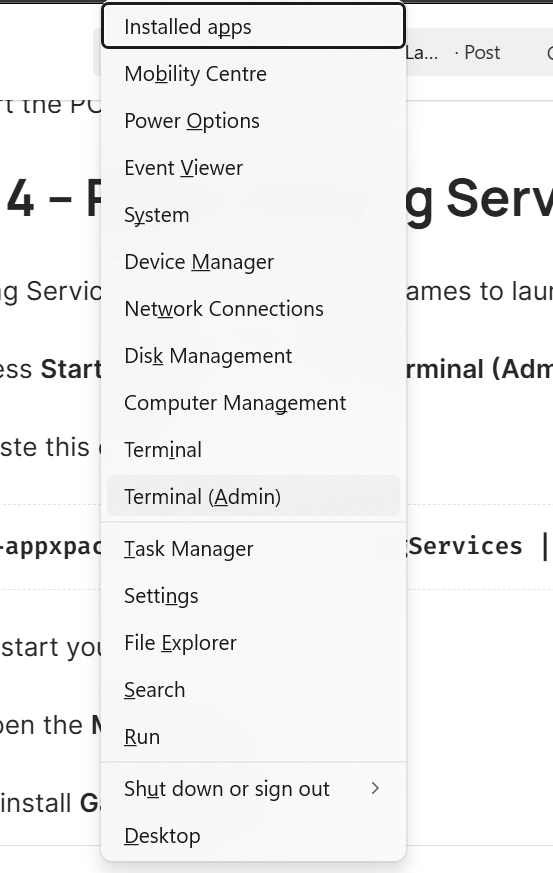
1 – Press Start button + X and open Terminal (Admin).
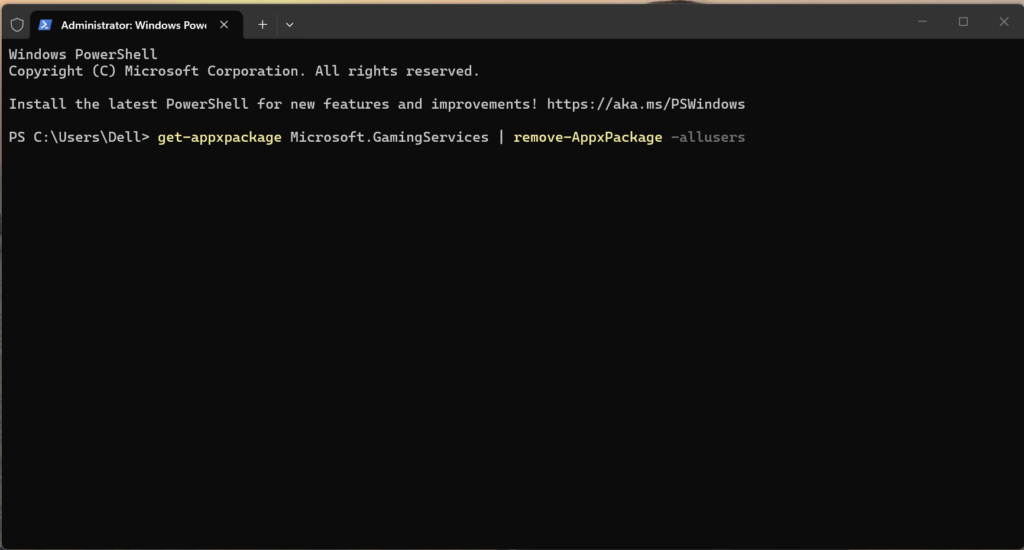
2 – Paste this command:
get-appxpackage Microsoft.GamingServices | remove-AppxPackage -allusers
3 – Restart your PC.
4 – Open the Microsoft Store.
5 – Reinstall Gaming Services.
Then launch the game again.
Fix 5 – Clear Microsoft Store Cache
The Store cache can silently break Xbox games. Fix it with these steps:
1 – Press Start button + R.
2 – Type:
wsreset.exe
3 – Press Enter.
4 – Wait for the Microsoft Store to reopen automatically.
Now test the game.
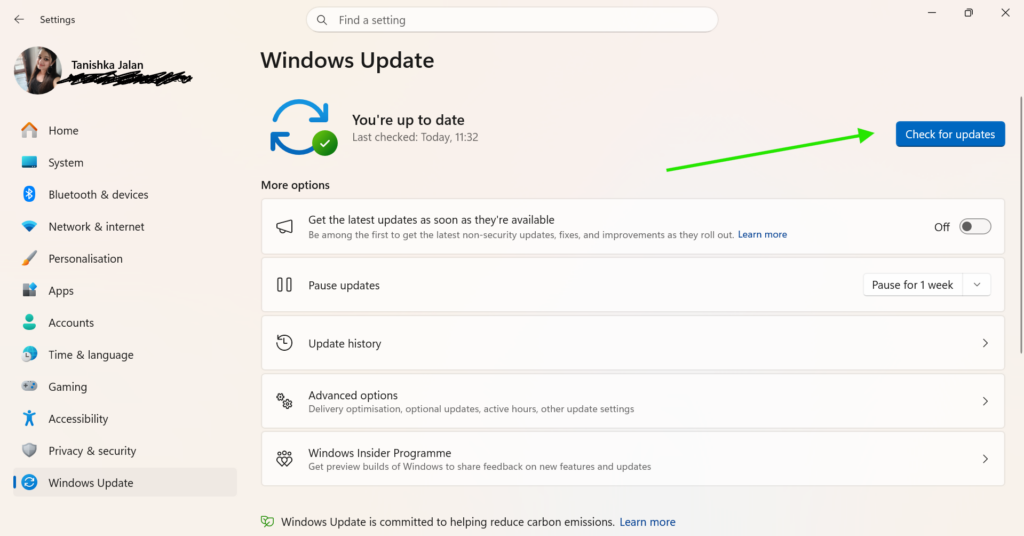
Fix 6 – Install Windows Updates
Missing updates can prevent newer games from opening. You must check for latest updates.
1 – Open Settings > Windows Update.
2 – Click Check for updates.
3 – Install everything available.
4 – Restart your PC.
Launch Forza Horizon 6 again.
Still, if Forza Horizon 6 is not launching. Uninstall the game completely and reinstall it from the Microsoft Store instead of the Xbox app.
That fixes many hidden license and launcher issues.

Leave a Reply