

The macOS operating system can download the new update updates automatically. Sometimes the update may break system and then you have to repair it which takes considerable time.
To avoid the consequences of automatic updates, users may turn off automatic updates. It can be easily done with the help of settings available in the System settings app. Still if you need the command line method here is how you can use it.
The command to disable automatic updates in MacOS is:
defaults write /Library/Preferences/com.apple.SoftwareUpdate AutomaticDownload -boolean falseThe defaults write command uses the preference file com.apple.SoftwareUpdate to specify the software update settings on the device. These settings let you specify whether to enable/disable automatic OS updates and check for new software updates.
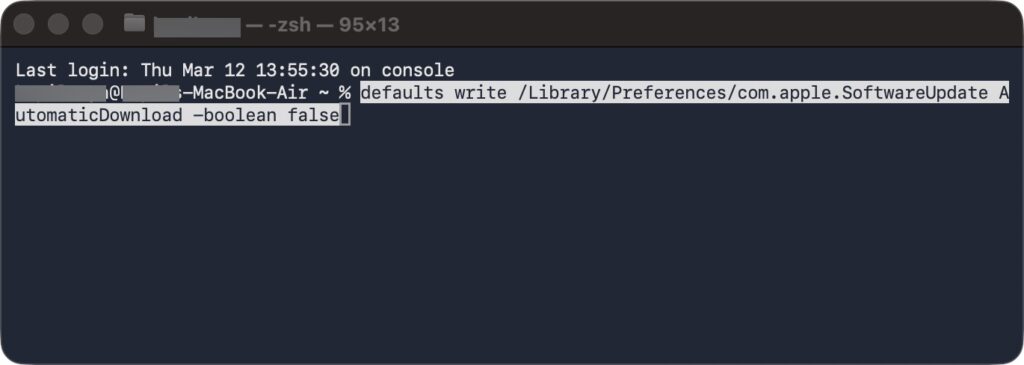
The AutomaticDownload key controls whether the automatic downloading of software updates should be enabled or disabled. Setting it to -boolean false disables automatic downloads.
This will disable the automatic download of new OS updates. However, the user will still receive notifications in case new updates are available but the updates will not be downloaded.
You must have the system settings then preferences window closed while you are executing the above mentioned command.
Note that even after executing the command about to avoid automatic updates still an admin level user can configure automatic updates in the system settings.
If you are trying to execute this script on multiple system to avoid automatic updates, you must verify the manual execution of the script.
After executing the abo mentioned command you should be avoiding the automatic updates from Apple.
Updates usually are safer but sometimes they can make more deeper issues than the previous instance. Still we are recommending that you must install the latest updates available on your Apple devices whenever possible.
If you ever want to reward the changes and want to enable automatic updates again you can instead run this command:
defaults write /Library/Preferences/com.apple.SoftwareUpdate AutomaticDownload -boolean true